Subscribe to your first event
Subscribe one of your existing functions to RECORD_CREATE so it runs every time a row is created in your app's data tables, then verify the subscription. Use a development site and a function you can delete or disable when you're done.
Before you start
- An app with a data table and at least one function — note the app slug (
APP_SLUG). For the REST steps, get the function's numericid(FUNCTION_ID) fromGET /api/apps/APP_SLUG/functions/. To create a function, see the Functions quickstart. - An organization owner or admin account, or another cloud user with access to the site. For the REST steps, generate an API key with that account on your app's Settings → Connect page and set it as
TARUVI_API_KEY. - Your site URL in
TARUVI_SITE_URL, from the same Settings → Connect page. - Functions basics — TaruviBase runs your function asynchronously when a matching change occurs.
Step 1 — Confirm RECORD_CREATE is a valid event
Every subscription is checked against a fixed registry of seven names.
- REST API
- TaruviBase Console
curl -sS "${TARUVI_SITE_URL}/api/cloud/events/" \
  -H "Authorization: Api-Key ${TARUVI_API_KEY}"
If successful, the request returns HTTP 200 OK and data.events contains RECORD_CREATE alongside the other six registry names.
Open your app in the Console and select Events in the sidebar. The seven registry events appear as tiles. If Record Create is present, you're ready to continue.

If the list is empty or the request returns 401 or 403, stop and fix your hostname or credentials — Troubleshoot Events has the recovery for each status.
Step 2 — Subscribe your function
Link your function to RECORD_CREATE. Subscribing needs an organization owner or admin, or another cloud user with access to the site.
- REST API
- TaruviBase Console
curl -sS -X POST "${TARUVI_SITE_URL}/api/cloud/events/RECORD_CREATE/subscribe/" \
  -H "Authorization: Api-Key ${TARUVI_API_KEY}" \
  -H "Content-Type: application/json" \
  -d "{\"function_id\":${FUNCTION_ID}}"
If successful, the request returns HTTP 201 Created and the response data echoes your subscription — look for event: "RECORD_CREATE" and function: FUNCTION_ID.
On the Events tile grid, press + on Record Create. Choose your function from the picker, then confirm.
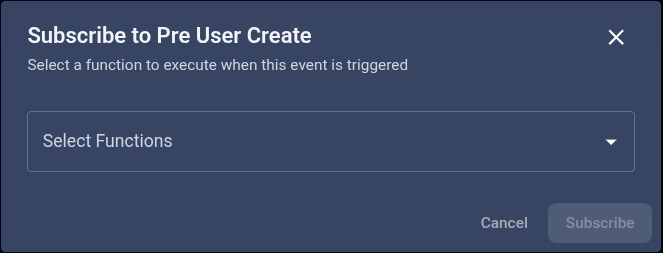
PRE_USER_CREATE, but you'll see Record Create in the header when you follow this step.If successful, the tile counter increments by one, and a success toast notification is displayed.
If the request fails:
400— the responsemessagenames the cause (duplicate subscription, badfunction_id, or unknown event name).403— your account can't manage subscriptions. Use an organization owner or admin, or another cloud user with access to the site; see Security and limits.
Step 3 — Verify the subscription is live
List the functions in your app that are subscribed to the event.
- REST API
- TaruviBase Console
curl -sS "${TARUVI_SITE_URL}/api/apps/APP_SLUG/events/RECORD_CREATE/" \
  -H "Authorization: Api-Key ${TARUVI_API_KEY}"
If successful, the request returns HTTP 200 OK with data.total_subscribers at least 1, and one entry in data.subscribers[] has your function_id with app_slug equal to APP_SLUG.
On the Record Create tile, press the eye icon. A dialog lists every subscribed function for this app, with slug and creation time. Your function appears as one row.
If successful, the dialog displays your subscribed function in the list.
Each subscriber entry also shows the function's filter_conditions. They belong to the function, not the subscription, and let it skip events it doesn't need. See Filter conditions.
Step 4 — Trigger it with one record
Create a record in any data table in APP_SLUG, in the Console under Datatables or with the REST API. Each new record fires one RECORD_CREATE event, and only subscribed functions in the same app run.
curl -sS -X POST "${TARUVI_SITE_URL}/api/apps/APP_SLUG/datatables/TABLE_NAME/data/" \
  -H "Authorization: Api-Key ${TARUVI_API_KEY}" \
  -H "Content-Type: application/json" \
  -d '{"name":"test"}'
What your function receives in params:
{
  "type": "RECORD_CREATE",
  "app_slug": "APP_SLUG",
  "datatable": "TABLE_NAME",
  "record_id": "RECORD_ID",
  "data": {"id": "RECORD_ID", "name": "test"}
}
data is one record: creating several records in one request fires one event per record. record_id is the record's primary key. See Emission and delivery for every event's payload.
Open your function's Execution History tab. If successful, a new run appears with trigger type event. The record is created even if the function doesn't run, so a missing run points at the subscription or the function — see Troubleshoot Events.
Step 5 — Clean up
Remove the subscription so the function stops firing on subsequent record inserts.
- REST API
- TaruviBase Console
curl -sS -X POST "${TARUVI_SITE_URL}/api/cloud/events/RECORD_CREATE/unsubscribe/" \
  -H "Authorization: Api-Key ${TARUVI_API_KEY}" \
  -H "Content-Type: application/json" \
  -d "{\"function_id\":${FUNCTION_ID}}"
If successful, the request returns HTTP 200 OK. Re-run Step 3; data.total_subscribers for APP_SLUG is now 0.
On the Record Create tile, press the eye icon, then delete the row for your function and confirm the dialog.
If successful, the tile counter drops back to 0.
Where to go next
- Manage subscriptions — list, subscribe, and unsubscribe across every event, not just
RECORD_CREATE. - Emission and delivery — filter conditions, blocking
PRE_USER_CREATE, and per-event payload shapes. - Security and limits — access rules, sensitive payloads, and limits.